The lesson
Put the buyer's inputs and the business-case outputs on the same screen, then explain the math immediately underneath.
The move
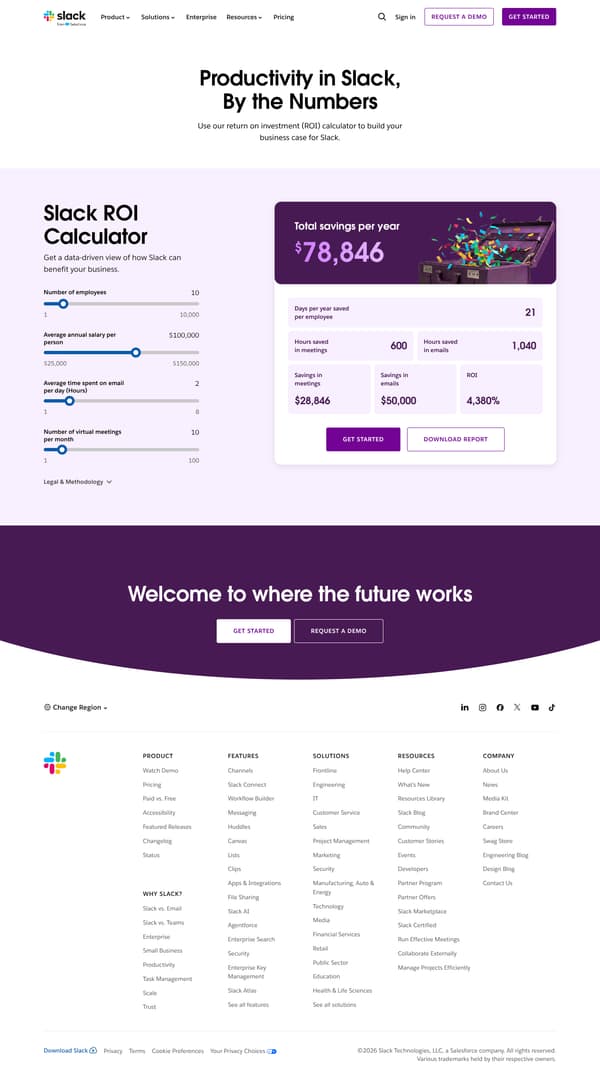
The page opens with "Productivity in Slack, By the Numbers" and a short line about using the ROI calculator to build a business case for Slack. The calculator then puts four sliders on the left and a purple results card on the right, led by "Total savings per year" and followed by days saved, meeting hours, email hours, savings in meetings, savings in emails, and ROI. Under the results are "GET STARTED" and "DOWNLOAD REPORT", followed by a "Legal & Methodology" section explaining the model and its assumptions. The page closes with "Welcome to where the future works" and repeats the main Slack calls to action.
Why it works
- Our readThe headline names the calculator's job before the form appears: use Slack numbers to build a business case.
- Our readThe inputs stay simple, with employees, salary, email time, and meetings as the only levers a visitor has to move.
- Our readThe results card separates total savings, days saved, hours saved, and ROI, so the reader can use either the money story or the time story.
What not to copy
Don't copy the exact savings model unless you can explain the assumptions behind it. Keep the side-by-side calculator structure, with plain inputs next to business-case outputs and methodology directly below.
More from Slack





More landing pages








Steal it for your brand.
Tell us what you want to make. We’ll talk through how to put these ideas to work for your brand.