The lesson
Pair a long contact form with three short promises in the product's own verbs, so the reader knows what the conversation is for.
The move
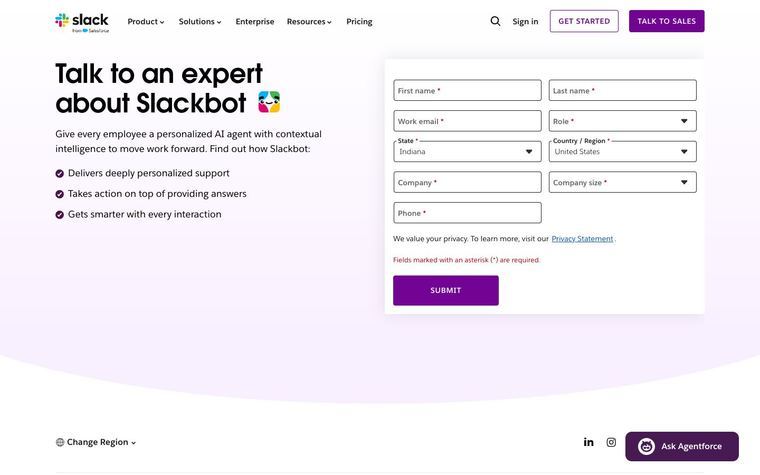
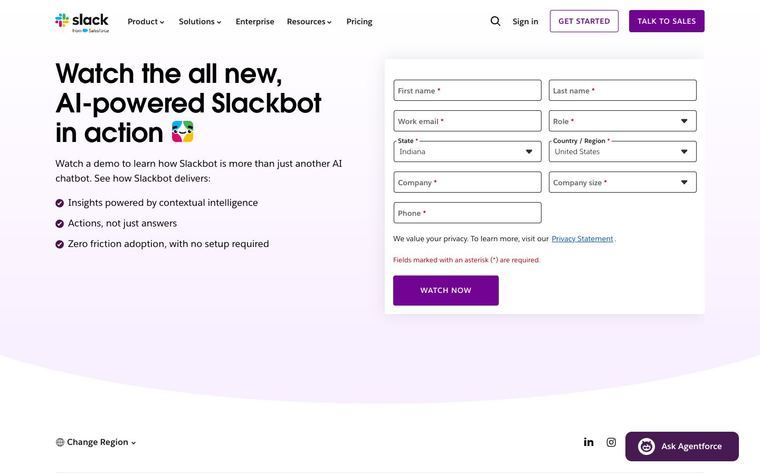
The headline is "Talk to an expert about Slackbot" with the Slackbot icon. Under it, "Find out how Slackbot:" is followed by three checked bullets: "Delivers deeply personalized support", "Takes action on top of providing answers", "Gets smarter with every interaction". The form beside it has nine required fields and a purple SUBMIT button.
Why it works
- Our readCalling the meeting "talk to an expert" frames the form as getting help rather than being handed to a salesperson.
- Our readThe three bullets sit in the left column beside the form, so the reasons to finish it stay on screen.
- Our readThe privacy line sits just above the submit button, answering the worry a work-email-and-phone form raises at the point of decision.
What not to copy
Nine required fields, including phone, is a high ask that works only if the intent is already strong. Keep the benefit bullets beside the form and trim fields to what your team uses.
More from Slack


More landing pages
Steal it for your brand.
Pitch Unfairly makes landing pages like this in your colors, type and voice. Free to start.