The lesson
Turn a product capability into a prompt guide by grouping copy-and-use examples around the real tasks users ask the tool to do.
The move
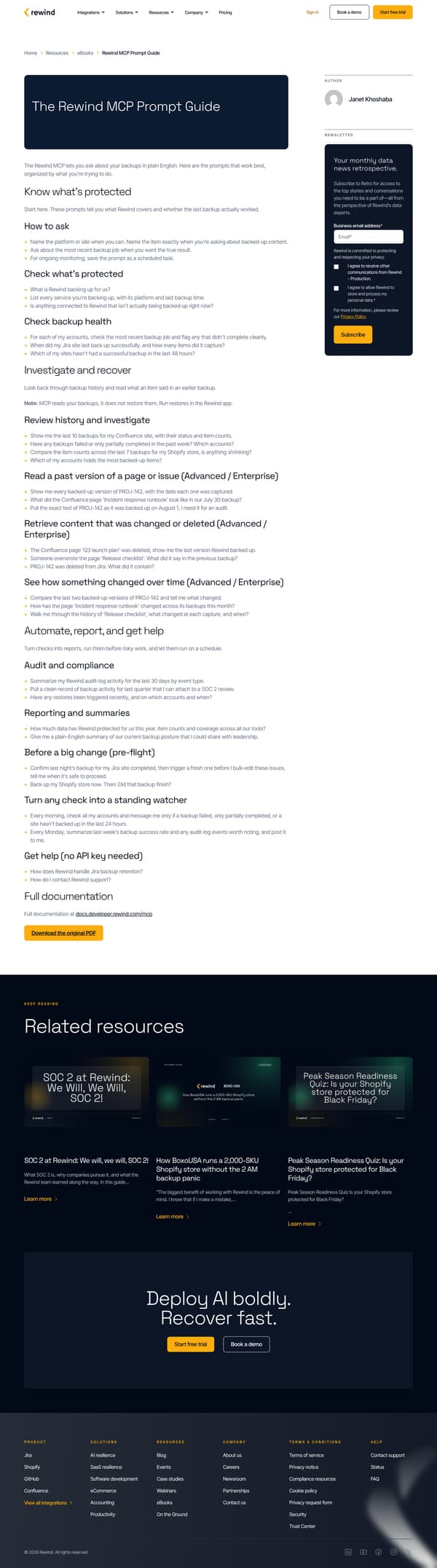
A dark title block introduces “The Rewind MCP Prompt Guide,” followed by a short explanation: “The Rewind MCP lets you ask about your backups in plain English.” The first section, “Know what’s protected,” gives “How to ask” bullets, then prompt groups for checking what is protected and backup health. “Investigate and recover” shifts into backup history, past versions, deleted content and change comparisons, with some prompts marked “Advanced / Enterprise.” The final section, “Automate, report, and get help,” turns checks into audit, reporting, pre-flight and standing-watcher prompts, then points readers to full documentation and the original PDF.
Why it works
- Our readThe guide starts with how to ask before listing prompts, so readers learn the pattern behind the examples instead of copying blindly.
- Our readHeadings such as “Know what’s protected,” “Investigate and recover,” and “Automate, report, and get help” organize prompts by the job the reader is trying to do.
- Our readNotes like “MCP reads your backups, it does not restore them” set a clear boundary before the reader tries a risky recovery task.
What not to copy
Don't copy Rewind's product terms, backup examples or platform-specific prompts. Keep the structure of one practical task heading, short usage guidance, then ready-to-use prompts grouped by the outcome the reader wants.
More from Rewind


More content marketing

Steal it for your brand.
Tell us what you want to make. We’ll talk through how to put these ideas to work for your brand.