The lesson
Lead with the customer's strongest outcome, then explain the small workflow changes that made the result believable.
The move
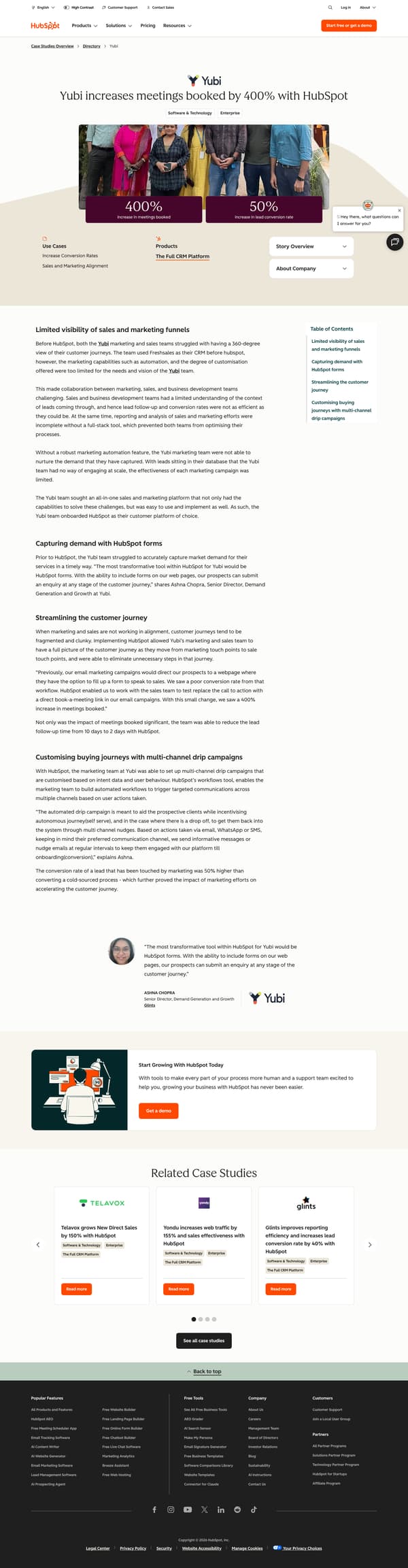
The page opens with the Yubi logo, the title “Yubi increases meetings booked by 400% with HubSpot,” category pills for “Software & Technology” and “Enterprise,” a team photo, and two result tiles: “400% increase in meetings booked” and “50% increase in lead conversion rate.” Below that, short metadata blocks list “Use Cases,” “Products,” and “Story Overview,” followed by the section “Limited visibility of sales and marketing funnels.” The story then moves through “Capturing demand with HubSpot forms,” “Streamlining the customer journey,” and “Customising buying journeys with multi-channel drip campaigns,” using quotes from Ashna Chopra to explain the operational changes. A table of contents, pull quote, HubSpot demo CTA, and related case studies close the page.
Why it works
- Our readThe headline names the customer and the main result, so the reader understands the story before entering the body copy.
- Our readThe two result tiles sit directly under the customer photo, making the outcome easy to scan before the narrative starts.
- Our readThe story ties each product use to a workflow change, from forms to direct book-a-meeting links to multi-channel drip campaigns.
What not to copy
Don't copy Yubi's Freshsales comparison, HubSpot forms language, or the email, WhatsApp and SMS drip campaign details. Keep the structure of a named customer problem, two visible result tiles, and workflow sections that show how the customer changed its sales and marketing process.
More from Hubspot

More case studies


Steal it for your brand.
Tell us what you want to make. We’ll talk through how to put these ideas to work for your brand.