The lesson
Put the join form beside a clear definition of the community, then use member quotes and programming details to make the space feel active.
The move
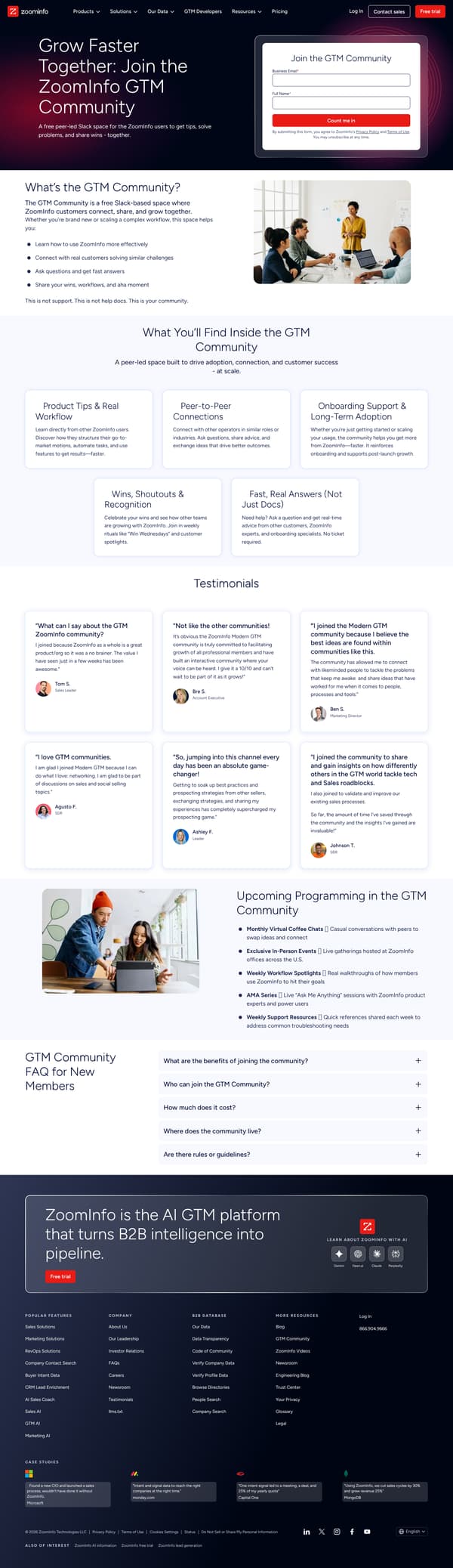
The page opens with “Grow Faster Together: Join the ZoomInfo GTM Community” and a short description of a free peer-led Slack space, beside a simple form asking for Business Email and Full Name. It then explains “What’s the GTM Community?” with bullets for learning, connecting, asking questions, and sharing wins. “What You’ll Find Inside the GTM Community” breaks the value into product tips, peer connections, onboarding support, recognition, and fast answers. The lower page stacks testimonials, “Upcoming Programming in the GTM Community,” and a “GTM Community FAQ for New Members.”
Why it works
- Our readThe first screen pairs the community promise with the signup form, so the reader can act before reading the full explanation.
- Our readThe section “What’s the GTM Community?” immediately says what it is, who it is for, and what it is not, which reduces confusion around support versus peer discussion.
- Our readMember testimonials arrive before the programming and FAQ, so the page proves the space with real user language before answering logistics.
What not to copy
Don't copy the Slack community offer unless you have active programming and peer participation to show. Keep the hero form, plain definition section, member quotes, and FAQ sequence.
More from Zoominfo


More landing pages








Steal it for your brand.
Tell us what you want to make. We’ll talk through how to put these ideas to work for your brand.