The lesson
Build a competitor page around the buyer's comparison steps: price, features, fit, proof, then objections.
The move
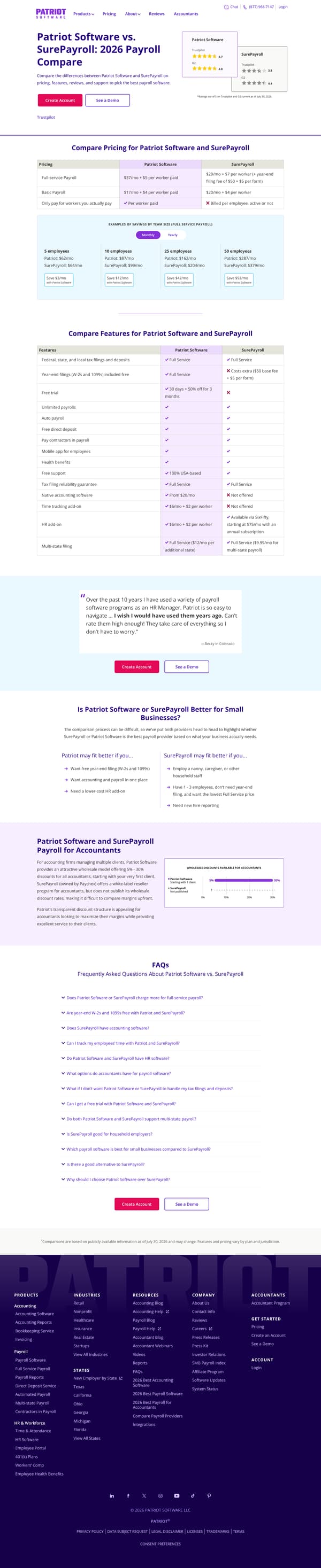
The page opens with "Patriot Software vs. SurePayroll: 2026 Payroll Compare" and a short promise to compare pricing, features, reviews, and support, with "Create Account" and "See a Demo" buttons beside review cards. It then shows "Compare Pricing for Patriot Software and SurePayroll," including Full-service Payroll, Basic Payroll, billing method, and savings examples by team size. Next it runs "Compare Features for Patriot Software and SurePayroll," followed by a customer quote, a fit section under "Is Patriot Software or SurePayroll Better for Small Businesses?", an accountant-focused section, and an FAQ list.
Why it works
- Our readThe hero states the comparison criteria first, naming pricing, features, reviews, and support before asking the reader to create an account or see a demo.
- Our readPutting the pricing table before the feature table answers the cost question early, then lets the reader check whether the lower-cost path still covers what they need.
- Our readThe section "Patriot may fit better if you…" and "SurePayroll may fit better if you…" gives the competitor a real place to win, which makes the comparison feel more useful than a one-sided pitch.
What not to copy
Don't copy the accountant section unless that channel matters to your sales motion. Keep the order of pricing first, features second, then a fair-fit section that says when each option may be better.
More from Patriotsoftware
More landing pages








Steal it for your brand.
Tell us what you want to make. We’ll talk through how to put these ideas to work for your brand.