The lesson
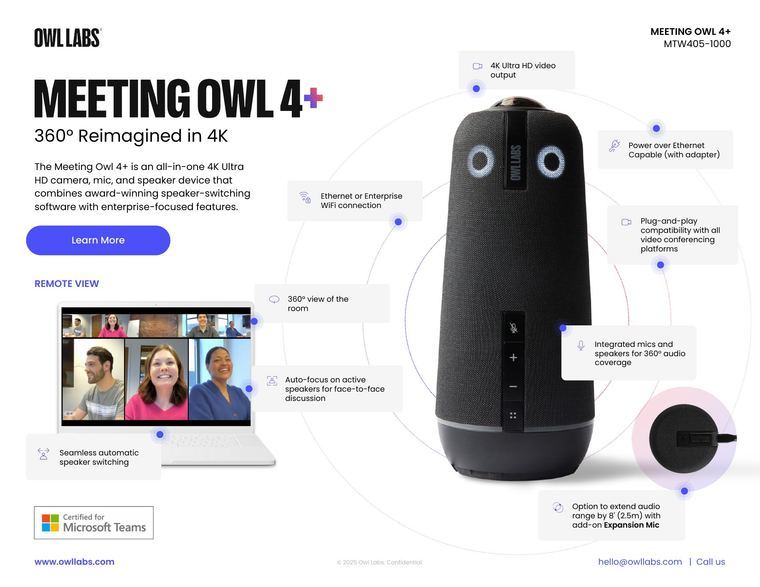
Arrange spec callouts around the product photo so the sheet reads as a labeled picture rather than a feature list.
The move
"MEETING OWL 4+" is set in condensed caps over "360° Reimagined in 4K", with a short paragraph and a blue "Learn More" button. The device sits large at right, ringed by circles carrying boxed callouts such as "4K Ultra HD video output". At left a laptop screen is captioned "REMOTE VIEW", above a "Certified for Microsoft Teams" mark.
Why it works
- Our readSetting the specs around the device on rings and dots lets the reader take in the hardware by looking.
- Our readThe laptop screen of the remote view shows the benefit as the person on the far end sees it, with its own callouts attached.
- Our readOne large product, one short paragraph and one button keep the sheet scannable.
What not to copy
Don't copy the exact callouts or the Teams badge; use only the specs your product has. Keep the product-as-diagram layout and one picture of the outcome.