The lesson
Give a gated trust document its own page: a three-paragraph summary, the cover art, and one short form directly below.
The move
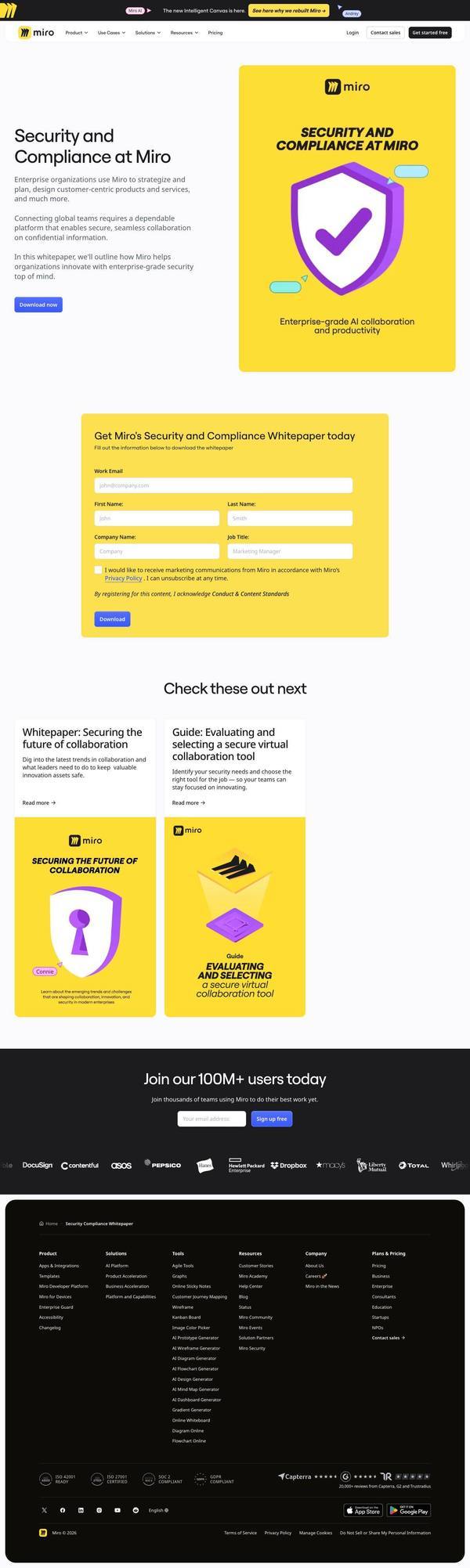
The hero is titled "Security and Compliance at Miro" with three short paragraphs and a blue "Download now" button beside a yellow shield-and-checkmark cover. Further down, a yellow form box reads "Get Miro's Security and Compliance Whitepaper today" with Work Email, First Name, Last Name, Company Name, Job Title and a Download button.
Why it works
- Our readThe cover art and the form box share the same yellow, so the form reads as the way to get the thing in the picture.
- Our readFive fields and a consent checkbox are a real cost for a buyer who only wants a security answer. This form suits lead capture more than trust.
- Our readTwo sibling assets, a whitepaper and a guide on evaluating a secure virtual collaboration tool, sit under the form as a next step needing no submission here.
What not to copy
Don't copy the generic claim "enterprise-grade security" without naming what backs it. Keep the single-document page with a hero button above a matching form.