The lesson
Let prospects click around a fully populated product with fake data, guided by a checklist of tasks they would do as customers.
The move
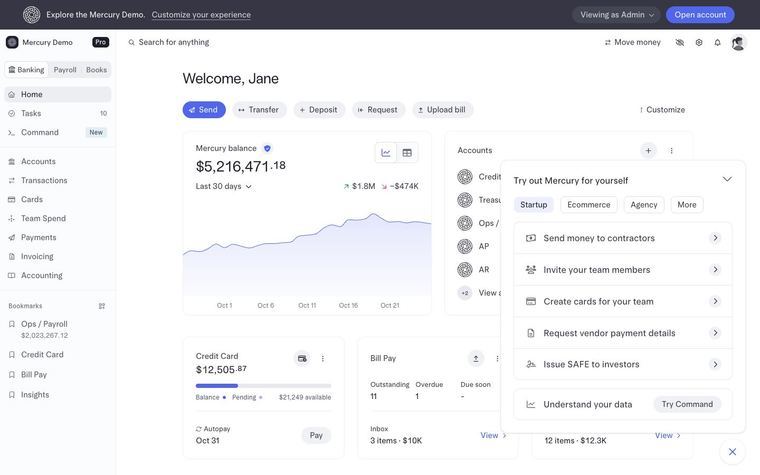
The demo opens on a dashboard for "Welcome, Jane" with a balance of $5,216,471.18. A top banner reads "Explore the Mercury Demo." beside an "Open account" button. A panel titled "Try out Mercury for yourself" has tabs Startup, Ecommerce, Agency and More, plus tasks like "Send money to contractors" and "Issue SAFE to investors".
Why it works
- Our readTasks phrased as jobs a founder actually does, such as "Request vendor payment details", give a stranger a first move inside an unfamiliar dashboard.
- Our readThe Startup, Ecommerce and Agency tabs invite the visitor to pick a business type like their own before trying tasks.
- Our readThe "Open account" button sits in the top bar beside the demo banner, so the next step is in view while exploring.
What not to copy
Don't copy the banking tasks or the balance figure. Seed your demo with data and tasks from your own buyers' work. Keep the guided checklist and the visible next step.