The lesson
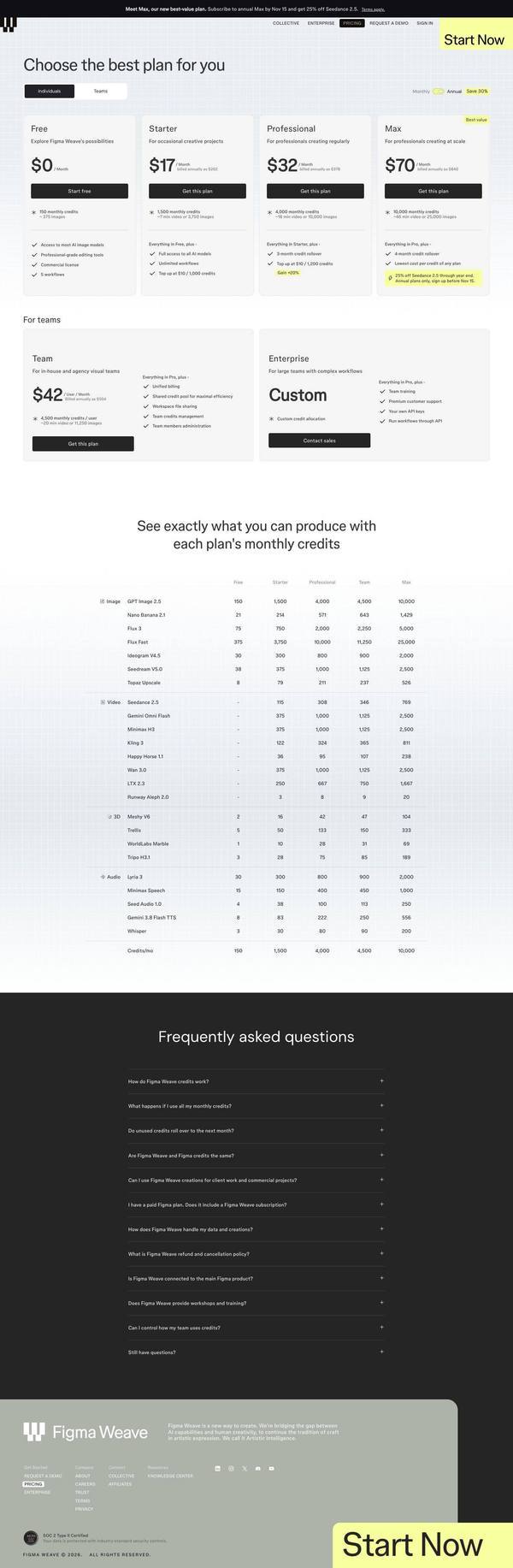
Put a credits-to-output conversion table under the price cards so buyers can see what each plan's allowance actually produces.
The move
Four individual plans (Free $0, Starter $17, Professional $32, Max $70 per month) sit above a Teams row with Team at $42 and Enterprise as Custom. Below, "See exactly what you can produce with each plan's monthly credits" lists models by plan, with GPT Image 2.5 running from 150 on Free to 10,000 on Max.
Why it works
- Our readCredits are an abstract unit, and the table converts them into images, video, 3D and audio per model, which makes a metered plan easier to judge.
- Our readA yellow "Best value" tag on Max and a highlighted 25% off Seedance 2.5 note draw the eye to Max, the priciest individual plan.
- Our readA long FAQ opening with "How do Figma Weave credits work?" and "What happens if I use all my monthly credits?" puts metered-plan objections in plain sight.
What not to copy
Don't copy the model list or tier names. Keep the habit of translating your own pricing unit into a concrete deliverable per tier, in a table buyers can scan.